Overview of Gemoo
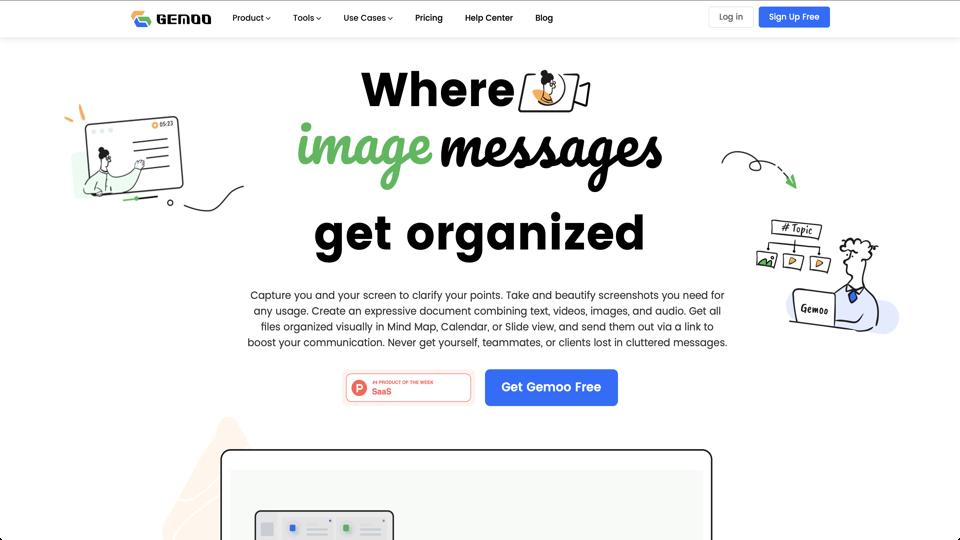
Gemoo is a versatile productivity tool designed for capturing, organizing, and sharing visual content such as screenshots, screen recordings, and interactive guides. Available at gemoo.com, it caters to professionals, educators, and teams who need efficient ways to communicate ideas visually. Gemoo combines features like screen recording, snapshot tools, and cloud-based organization into a user-friendly platform, making it a strong alternative to tools like Loom or Snagit. It emphasizes ease of use, collaboration, and integration with other apps, with both free and paid plans available.
Key Features
- Screen Recording: Capture high-quality videos with audio narration, annotations, and editing tools for quick tutorials or demos.
- Snapshots and Annotations: Take screenshots, add markup, and organize them into visual boards or mind maps.
- Organization Tools: Use “Gemoos” (visual decks) to group content, create workflows, and share via links or embeds.
- Collaboration: Real-time sharing, comments, and integrations with Slack, Trello, and other productivity apps.
- AI Enhancements: Automatic transcription for recordings and smart organization suggestions.
- Cross-Platform Support: Works on Windows, macOS, web, and mobile devices.
Pros
- Intuitive interface that’s easy for beginners to pick up.
- Excellent for remote teams with seamless sharing and collaboration features.
- Free tier offers generous features without watermarks.
- High-quality output with customizable settings for video and image exports.
- Regular updates and responsive customer support.
Cons
- Limited advanced editing features compared to dedicated video editors like Camtasia.
- Storage limits on free plans may require upgrading for heavy users.
- Occasional bugs in the desktop app, though these are being addressed in updates.
- Pricing can add up for larger teams needing premium features.
Pricing
Gemoo offers a free plan with basic features, including unlimited screenshots and up to 5 minutes of recording. Paid plans start at $4.99/month for the Pro tier (unlimited recording time, advanced editing) and go up to $9.99/month for Teams (with collaboration tools). Enterprise options are available for custom needs. All plans include cloud storage and priority support.
Conclusion
Overall, Gemoo is a solid 4.5/5 tool for anyone needing quick visual communication without the complexity of heavier software. It’s particularly great for content creators, educators, and remote workers. If you’re looking for an all-in-one visual productivity booster, give it a try via their website. For more specialized needs, consider pairing it with dedicated editing tools.