Overview of Whybug Explain
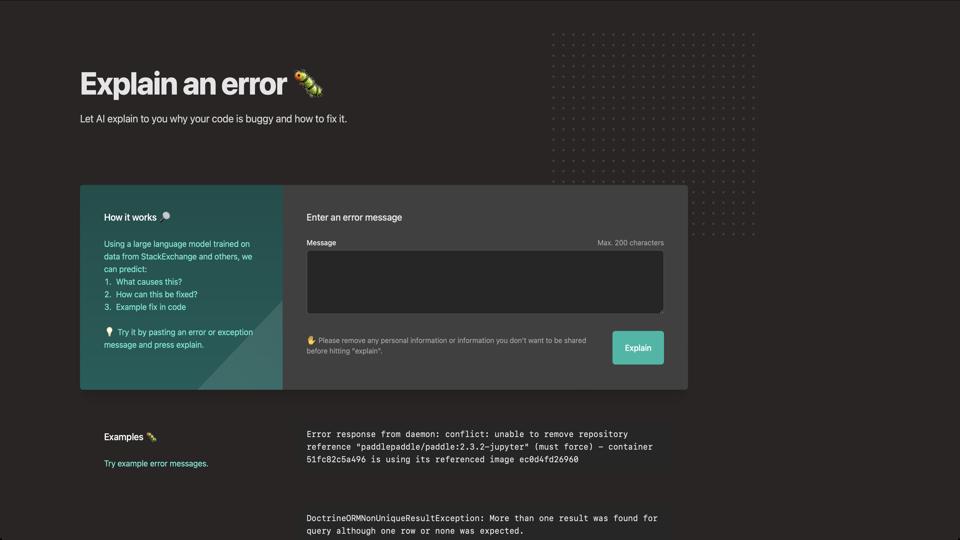
Whybug Explain, accessible at https://explain.whybug.com/, is an AI-powered tool designed to help developers debug and understand error messages. It uses advanced language models to analyze stack traces, error logs, and code snippets, providing clear explanations, potential causes, and step-by-step fixes. This tool is particularly useful for programmers of all levels, from beginners troubleshooting common issues to experienced developers dealing with complex bugs. It’s free to use and requires no signup, making it a quick and accessible resource.
Key Features
- AI-Driven Error Analysis: Paste your error message or stack trace, and the tool generates a detailed breakdown, including what went wrong and why.
- Multi-Language Support: Works with popular programming languages like Python, JavaScript, Java, and more, automatically detecting the context.
- Step-by-Step Solutions: Offers actionable advice, code suggestions, and links to relevant documentation or Stack Overflow threads.
- User-Friendly Interface: Simple web-based design with a text input area and instant results; no installation required.
- Privacy-Focused: Processes data on the client-side where possible, ensuring sensitive code isn’t stored on servers.
Pros
- Extremely fast and convenient for quick debugging sessions.
- Helps demystify cryptic error messages, saving time on research.
- Free and open to everyone, with no hidden costs or subscriptions.
- Integrates well with development workflows, as explanations can be copied and shared easily.
Cons
- Accuracy depends on the AI model; it may occasionally provide incorrect or incomplete advice for niche or very complex errors.
- Limited to text-based input; doesn’t support uploading files or integrating directly with IDEs.
- No advanced features like version history or collaborative editing in the free version.
- Relies on internet connectivity, which could be a drawback in offline environments.
Pricing
Whybug Explain is completely free to use. There are no premium tiers or paid features mentioned on the site, making it an excellent budget-friendly option. However, for more advanced debugging needs, users might consider Whybug’s other tools or integrations, which could involve costs.
Who Should Use It?
This tool is ideal for software developers, students learning to code, and anyone frequently encountering runtime errors. It’s especially beneficial for solo developers or small teams looking for an instant second opinion on bugs without diving into forums.
Final Verdict
Overall, Whybug Explain earns a strong 4.5 out of 5 stars. It’s a handy, innovative tool that leverages AI to make debugging less frustrating. While it’s not a replacement for deep debugging skills, it’s a fantastic starting point for understanding errors. If you’re tired of googling cryptic messages, give it a try at explain.whybug.com.